MUZZLE FLASH, MY FRIEND
tl;dr: Locate and sort out your muzzle flashes and other stock footage elements quick and easy.
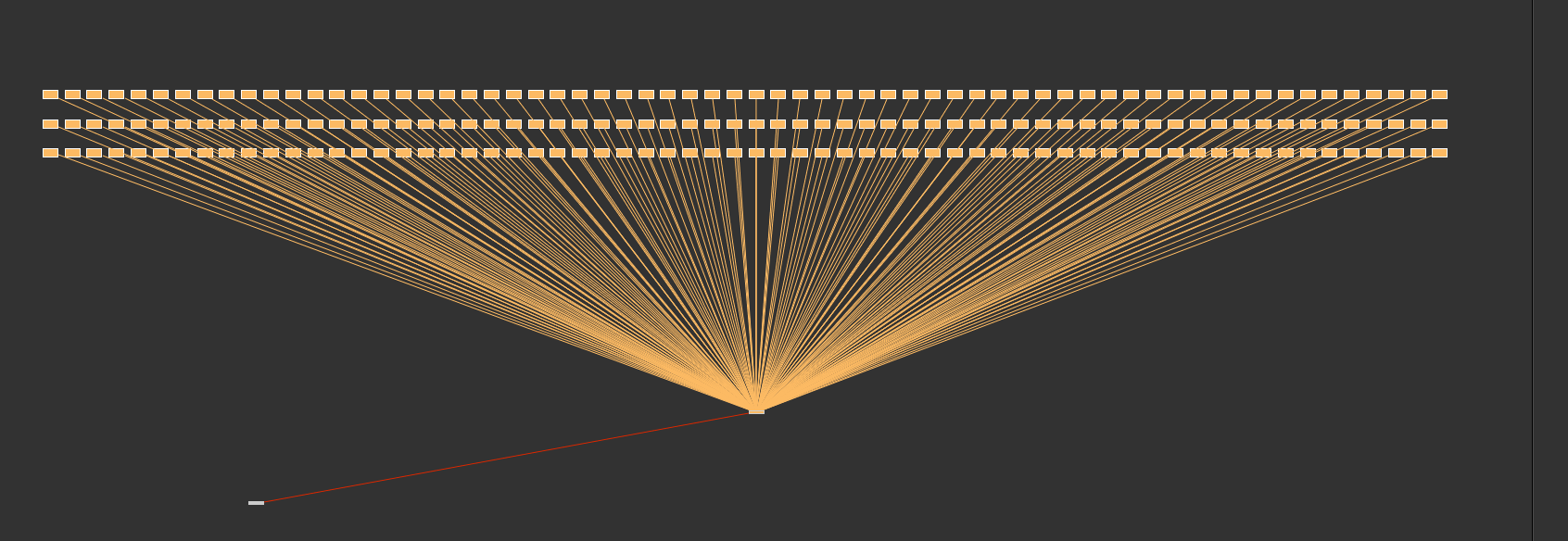
Ok, once one of those guys appear, you would ideally want to lock down the frame where this is happening. For such a thing, you can use a FrameHold Node in Nuke, a timeline marker in After Effects or just take a note on a notebook, to mention a few options. You would continue the same way up until you would have located all the muzzle flashes.
I leave you to reckon with how long any of these approaches would take…
Let´s get this straight. What if you could, just by clicking on a button, automatically build a contact sheet displaying all the different muzzle flash elements there are, therefore enabling you to easily check out the different types, camera angles and so on, and then, once you have built that contact-sheet up, go to any of the individual files and extract all the muzzle flashes in that file?
Well, that, along with other fancy add-ons, is exactly what this script does.
Honestly, this is a fairly simple code. Just a few functions, a class definition to help build a nuke Python Panel, and some global variables. In the form of “pseudo code”, here is the thing:
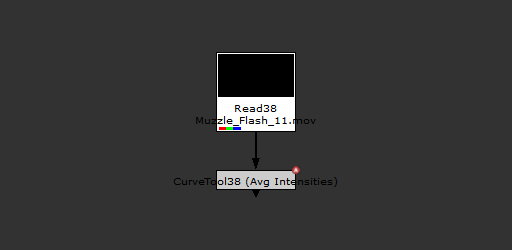
2 – detect: depending on the so-called “build mode” (I´ll go over this later), it either drops a Framehold node each time a muzzle flash is detected or just one for the muzzle flash that has the maximum luminance intensity, thus locking down either all of them, or just the brightest one.
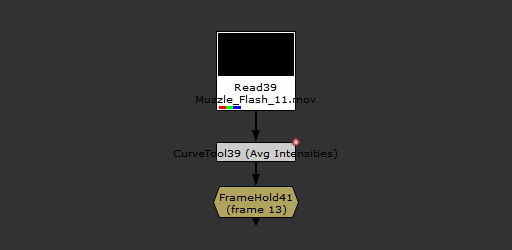
3 – build: with all detected muzzle flashes locked down with a Framehold node, the script then builds a contact sheet with all of them, and then drops a text node connected to each of the files displaying its name on the screen, automatically.
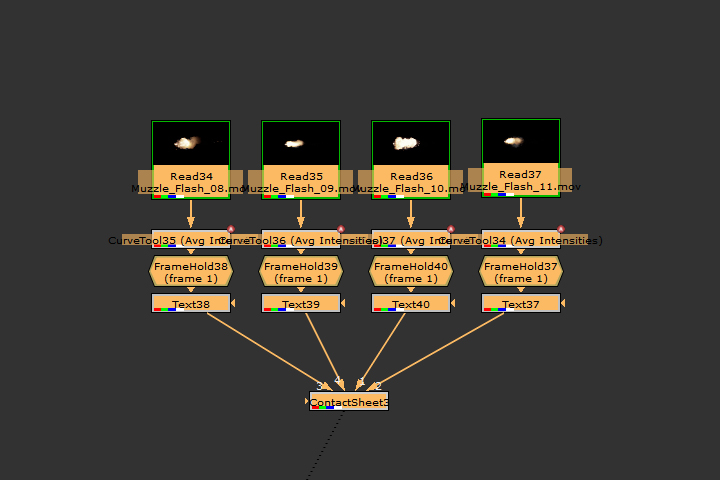
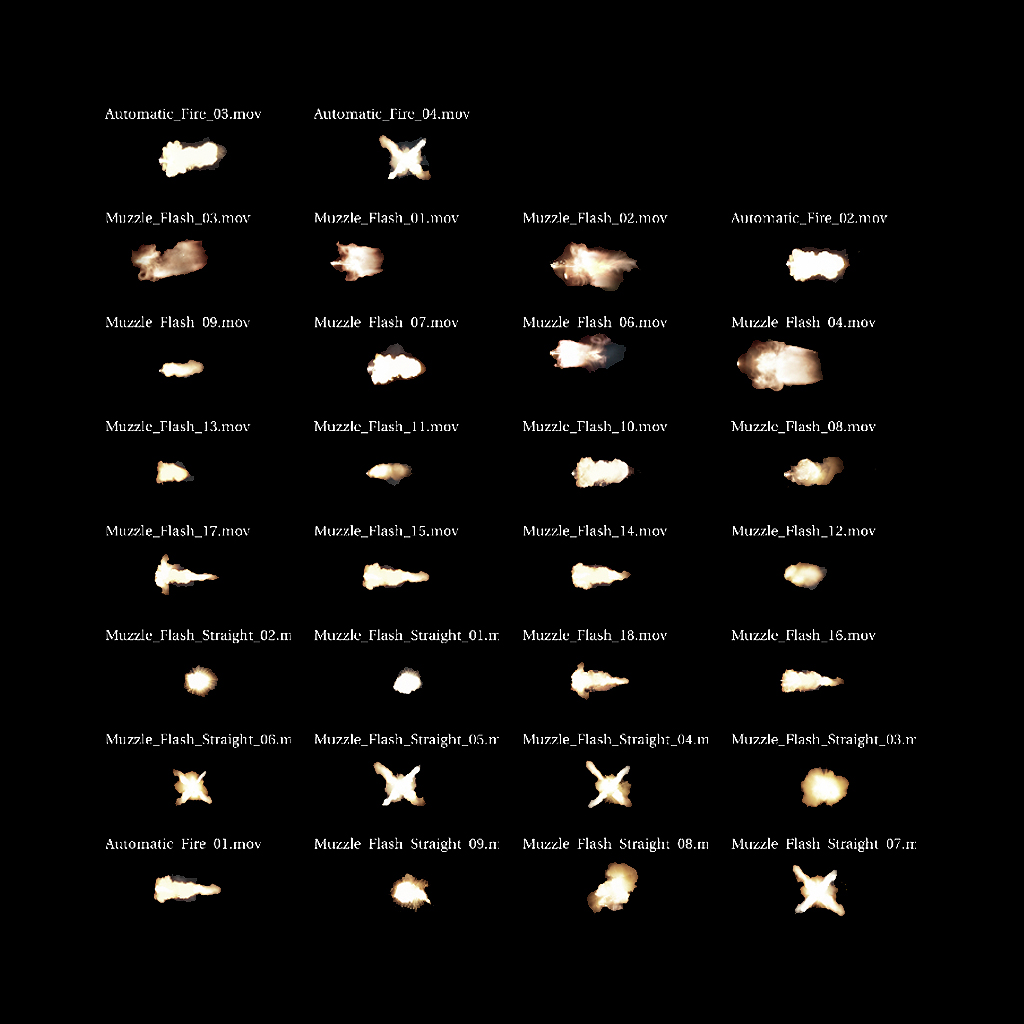
5 – How to use it.
1 – distribute the code. As we know, when it comes to Python Scripts, we need to be able to import them in Nuke with the command “import module_name”. We can do this either by defining the PYTHON_PATH environment variable or simply by adding within the init.py file the folder structure where we will place our Gizmos, Plugins, Python Scripts and so on, using the command “nuke.pluginAddPath”. If none of this options sound familiar to you, then just drop the script on to the user´s .nuke folder and hope for the best.
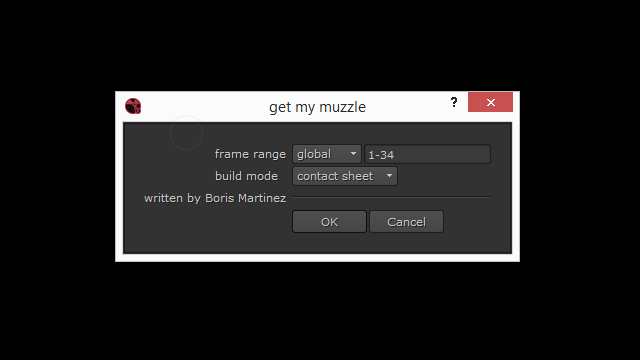
– build mode: extract will get all the muzzle flashes in all selected clips. Build will get one muzzle flash per clip, exactly that with the maximum brightness.
important: If you find this usefull, it´s always better to create a Nuke menu from where to call the function.
code
#!/usr/bin/env python

import nuke
import nukescripts

print "importing nuke..."
print "importing nukescripts..."


########################################################################################################################

__author__ = "Boris Martinez Castillo"
__version__ = "1.0.1"
__maintainer__ = "Boris Martinez Castillo"
__email__ = "boris.vfx@outlook.com"

########################################################################################################################

START_FRAME = int(nuke.root()['first_frame'].value())
LAST_FRAME = int(nuke.root()['last_frame'].value())


def get_file_name(f):
    return f['file'].value().split('/')[-1]

def set_name(n):
    txt = nuke.createNode("Text2")
    msg = txt['message'].setValue(n)
    return txt

def content_finder():
    SEL = nuke.selectedNodes()  # HOLD ALL SELECTED NODES
    fh_sel_list = []
    txt_sel_list = []
    counter = 0

    for i in SEL:
        start_frame = i.firstFrame()
        end_frame = i.lastFrame()
        print start_frame
        print end_frame
        i['selected'].setValue('False')  # DE-SELECT CURRENT NODE FROM SELECTION LIST.

        cv = nuke.createNode("CurveTool")
        nuke.execute(cv, START_FRAME, LAST_FRAME)  # EXECUTES CURVE TOOL

        if type(get_stop_frame(cv)) == list:

            for e in get_stop_frame(cv):
                fh = nuke.createNode("FrameHold")
                fh.setInput(0, cv)
                fh['first_frame'].setValue(int(e))
                label = set_name(get_file_name(i))
                txt_sel_list.append(label.name())
                read_recolor(nuke.toNode(i.name()), 112656639)
            counter += 1
            print counter
        else:
            read_recolor(nuke.toNode(i.name()), 3238002943)
            counter += 1
        if counter == len(SEL):
            print "txt_sel_list: ", txt_sel_list
            return txt_sel_list

def content_finder_input():
    SEL = nuke.selectedNodes()  # HOLD ALL SELECTED NODES
    fh_sel_list = []
    txt_sel_list = []
    counter = 0

    for i in SEL:
        start_frame = i.firstFrame()
        end_frame = i.lastFrame()
        print start_frame
        print end_frame
        i['selected'].setValue('False')  # DE-SELECT CURRENT NODE FROM SELECTION LIST.

        cv = nuke.createNode("CurveTool")
        nuke.execute(cv, start_frame, end_frame)  # EXECUTES CURVE TOOL

        if type(get_stop_frame(cv)) == list:

            for e in get_stop_frame(cv):
                fh = nuke.createNode("FrameHold")
                fh.setInput(0, cv)
                fh['first_frame'].setValue(int(e))
                label = set_name(get_file_name(i))
                txt_sel_list.append(label.name())
                read_recolor(nuke.toNode(i.name()), 112656639)
            counter += 1
            print counter
        else:
            read_recolor(nuke.toNode(i.name()), 3238002943)
            counter += 1
        if counter == len(SEL):
            print "txt_sel_list: ", txt_sel_list
            return txt_sel_list

def content_finder_custom(sf,lf):
    SEL = nuke.selectedNodes()  # HOLD ALL SELECTED NODES
    fh_sel_list = []
    txt_sel_list = []
    counter = 0

    for i in SEL:
        start_frame = i.firstFrame()
        end_frame = i.lastFrame()
        print start_frame
        print end_frame
        i['selected'].setValue('False')  #  DE-SELECT CURRENT NODE FROM SELECTION LIST

        cv = nuke.createNode("CurveTool")
        nuke.execute(cv, sf, lf)  #  EXECUTES CURVE TOOL

        if type(get_stop_frame(cv)) == list:

            for e in get_stop_frame(cv):
                fh = nuke.createNode("FrameHold")
                fh.setInput(0, cv)
                fh['first_frame'].setValue(int(e))
                label = set_name(get_file_name(i))
                txt_sel_list.append(label.name())
                read_recolor(nuke.toNode(i.name()), 112656639)
            counter += 1
            print counter
        else:
            read_recolor(nuke.toNode(i.name()), 3238002943)
            counter += 1
        if counter == len(SEL):
            print "txt_sel_list: ", txt_sel_list
            return txt_sel_list

def content_finder_int():
    SEL = nuke.selectedNodes()  # HOLD ALL SELECTED NODES
    fh_sel_list = []
    txt_sel_list = []
    counter = 0

    for i in SEL:

        i['selected'].setValue('False')  # DE-SELECT CURRENT NODE FROM SELECTION LIST

        cv = nuke.createNode("CurveTool")
        nuke.execute(cv, START_FRAME, LAST_FRAME)  #  EXECUTES CURVE TOOL

        if type(get_stop_frame_int(cv)) == int:

            fh = nuke.createNode("FrameHold")
            fh['first_frame'].setValue(get_stop_frame_int(cv))
            label = set_name(get_file_name(i))
            txt_sel_list.append(label.name())
            read_recolor(nuke.toNode(i.name()), 112656639)
            counter += 1
            print counter
        else:
            read_recolor(nuke.toNode(i.name()), 3238002943)
            counter += 1
        if counter == len(SEL):
            print txt_sel_list
            return txt_sel_list

def content_finder_int_input():
    SEL = nuke.selectedNodes()  # HOLD ALL SELECTED NODES
    fh_sel_list = []
    txt_sel_list = []
    counter = 0

    for i in SEL:
        start_frame = i.firstFrame()
        end_frame = i.lastFrame()
        print start_frame
        print end_frame
        i['selected'].setValue('False')  # DE-SELECT CURRENT NODE FROM SELECTION LIST

        cv = nuke.createNode("CurveTool")
        nuke.execute(cv, start_frame, end_frame)  #  EXECUTES CURVE TOOL

        if type(get_stop_frame_int(cv)) == int:

            fh = nuke.createNode("FrameHold")
            fh['first_frame'].setValue(get_stop_frame_int(cv))
            label = set_name(get_file_name(i))
            txt_sel_list.append(label.name())
            read_recolor(nuke.toNode(i.name()), 112656639)
            counter += 1
            print counter
        else:
            read_recolor(nuke.toNode(i.name()), 3238002943)
            counter += 1
        if counter == len(SEL):
            print txt_sel_list
            return txt_sel_list

def content_finder_int_custom(sf,lf):
    SEL = nuke.selectedNodes()  # HOLD ALL SELECTED NODES
    fh_sel_list = []
    txt_sel_list = []
    counter = 0

    for i in SEL:
        start_frame = i.firstFrame()
        end_frame = i.lastFrame()
        print start_frame
        print end_frame
        i['selected'].setValue('False')  # DE-SELECT CURRENT NODE FROM SELECTION LIST

        cv = nuke.createNode("CurveTool")
        nuke.execute(cv, sf, lf)  # EXECUTES CURVE TOOL
        print
        if type(get_stop_frame_int(cv)) == int:

            fh = nuke.createNode("FrameHold")
            fh['first_frame'].setValue(get_stop_frame_int(cv))
            label = set_name(get_file_name(i))
            txt_sel_list.append(label.name())
            read_recolor(nuke.toNode(i.name()), 112656639)
            counter += 1
            print counter
        else:
            read_recolor(nuke.toNode(i.name()), 3238002943)
            counter += 1
        if counter == len(SEL):
            print txt_sel_list
            return txt_sel_list

def attach_contact_sheet(l):

    print "attach_contact_sheet list: ", l
    all_nodes = len(l)

    [nuke.toNode(i)['selected'].setValue('True') for i in l]
    contact_sheet = nuke.createNode("ContactSheet")
    columns = int(contact_sheet["columns"].getValue())
    rows = (all_nodes / columns) + 1
    contact_sheet["rows"].setValue(rows)


def read_recolor(l,c):
    l['tile_color'].setValue(c)
    return

def get_other_muzzles(l,f,a):
    for i in l:
        if i > f:
            a.append(i)
    return a

def get_frames(anim,value,li):
    frame = 0
    for key in anim.keys():
        x_value = key.x
        y_value = key.y
        if y_value == value:
            frame = x_value
            li.append(frame)
            break
    return li

def get_stop_frame(node):
    anim_curve_x = node['intensitydata'].animation(0)
    y_list = []
    stop_frame = 0

    for key in anim_curve_x.keys():
        x_value = key.x
        y_value = key.y
        y_list.append(y_value)


    y_max_value = max(y_list) # CALCULATE MAX VALUE
    other_muzzles = []
    other_stop_frames = []

    print "max value found: ", y_max_value

    om = get_other_muzzles(y_list,0.05,other_muzzles)
    print "other_muzzles: ",om
    for i in om:
        get_frames(anim_curve_x,i,other_stop_frames)

    print "other_stop_frames: ", other_stop_frames

    if y_max_value < 0.05:
        return None

    for key in anim_curve_x.keys():
        x_value = key.x
        y_value = key.y
        if y_value == y_max_value:
            stop_frame = x_value
            break

    return other_stop_frames

def get_stop_frame_int(node):
    anim_curve_x = node['intensitydata'].animation(0)
    y_list = []
    stop_frame = 0

    for key in anim_curve_x.keys():
        x_value = key.x
        y_value = key.y
        y_list.append(y_value)


    y_max_value = max(y_list)  # CALCULATE MAX VALUE
    other_muzzles = []
    other_stop_frames = []

    print "max value found: ", y_max_value

    om = get_other_muzzles(y_list, 0.05, other_muzzles)
    print "other_muzzles: ", om
    for i in om:
        get_frames(anim_curve_x, i, other_stop_frames)

    print "other_stop_frames: ", other_stop_frames

    if y_max_value < 0.05:
        return None

    for key in anim_curve_x.keys():
        x_value = key.x
        y_value = key.y
        if y_value == y_max_value:
            stop_frame = x_value
            break

    return int(stop_frame)

def main_function():
    panel = modalPanel()
    if not panel.showModalDialog():
        print "script aborted"
        return
    else:
        print "script run"
        if panel.giveFrameRangeValue() == "global" and panel.analysis_mode.value() == "extract" :
            attach_contact_sheet(content_finder())
            return
        elif panel.giveFrameRangeValue() == "input" and panel.analysis_mode.value() == "extract":
            attach_contact_sheet(content_finder_input())
            return
        elif panel.giveFrameRangeValue() == "custom" and panel.analysis_mode.value() == "extract":
            range = panel.frame_display.value()
            start_frame = int(range.split("-")[0])
            end_frame = int(range.split("-")[-1])
            print start_frame, end_frame
            attach_contact_sheet(content_finder_custom(start_frame,end_frame))
            return
        elif  panel.giveFrameRangeValue() == "global" and panel.analysis_mode.value() == "contact sheet":
            attach_contact_sheet(content_finder_int())
            return
        elif panel.giveFrameRangeValue() == "input" and panel.analysis_mode.value() == "contact sheet":
            attach_contact_sheet(content_finder_int_input())
            return
        elif panel.giveFrameRangeValue() == "custom" and panel.analysis_mode.value() == "contact sheet":
            range = panel.frame_display.value()
            start_frame = int(range.split("-")[0])
            end_frame = int(range.split("-")[-1])
            print start_frame, end_frame
            attach_contact_sheet(content_finder_int_custom(start_frame, end_frame))
            return
        else:
            print "pass"
            return

#CREATE A PYTHON PANEL FOR DEALING WITH TIME RANGES

class modalPanel(nukescripts.PythonPanel):

    def __init__(self):
        nukescripts.PythonPanel.__init__(self,"get my muzzle")
        #CREATE KNOBS
        self.frame_range = nuke.Enumeration_Knob('fRange','frame range', ['global','input','custom'])
        self.analysis_mode = nuke.Enumeration_Knob('mode','build mode  ', ['contact sheet','extract'])
        self.frame_display = nuke.String_Knob("")
        self.frame_display.clearFlag(nuke.STARTLINE)
        self.author = nuke.Text_Knob("written by Boris Martinez")
        #ADD KNOBS
        for i in (self.frame_range,self.frame_display,self.analysis_mode,self.author):
            self.addKnob(i)
        #SET KNOB DEFAULT VALUES
        self.get_frame_range()

    def giveFrameRangeValue(self):
        return self.frame_range.value()

    def get_frame_range(self):
        if self.giveFrameRangeValue() == "global":
            first_frame = nuke.root().firstFrame()
            last_frame = nuke.root().lastFrame()
            txt = str(int(first_frame)) + '-' + str(int(last_frame))
            self.frame_display.setValue(txt)
        elif self.giveFrameRangeValue() == "input":
            print "here should come the read frame range"
            node = nuke.selectedNode()
            first_frame = node.firstFrame()
            last_frame = node.lastFrame()
            txt = str(int(first_frame)) + '-' + str(int(last_frame))
            self.frame_display.setValue(txt)
        elif self.giveFrameRangeValue() == "custom":
            self.frame_display.setValue("")
            print "here the user decides"

    def knobChanged(self,knob):
        if knob.name() == "fRange":
            self.get_frame_range()


if __name__ == "__main__":
    main_function()